
User guide
Step-by-step help for employees, managers and HR admins.
From your first login to reading your payslip.
First login
Get invited
HR creates your account; you receive an email or a temporary password from HR.
Sign in with the temporary password
Sign in on web or mobile and change the password right away.
Pick your language
Language is a personal setting: choose once, every device follows.
Clocking in
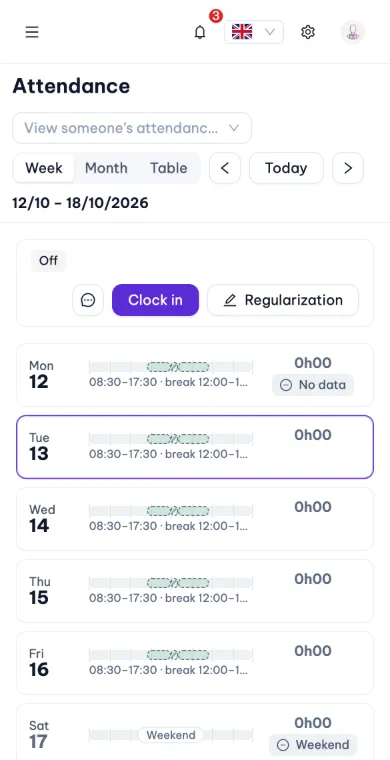
One tap
Open the app and tap "Clock in". No GPS needed unless the company turned it on.
When verification is on
GPS / Wi-Fi / QR / selfie appear in the app; follow the on-screen hints.
Flags
Outside the area → still recorded, HR reviews; nobody loses a day over a GPS drift.
Leave & OT requests
Create a leave request
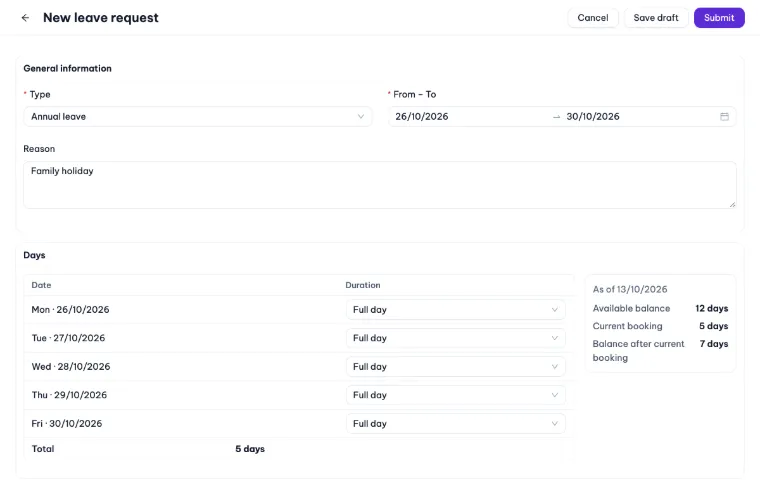
Pick the type, dates (half days too) and a reason; your balance is shown immediately.
Register OT
Pick the day and time window; 150 / 200 / 300 % is set from the day type.
Track it
The request detail shows who it is waiting for, who decided, and the full history.
Payslips
Unlock
Face ID / Touch ID or password → amounts visible for 5 minutes.
Acknowledge
Tap Acknowledge when the payslip is right.
Dispute
Wrong days or amounts → Dispute; HR handles it and adjusts the next period.