

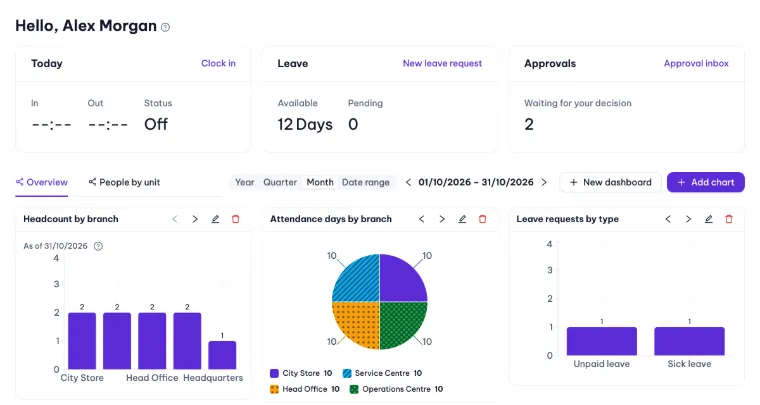
Dashboards for every month, quarter or year
Start with ready-made dashboards and add your own charts for headcount, attendance, leave and overtime.
HRM software for every team
Funexti Human brings people records, attendance, shifts, leave and overtime, approvals, payroll, tasks and company documents together on the web and in a mobile app. It fits a single shop, a growing company or a group of companies.
14-day Plus trial · No payment card · Then continue on Free and keep your data
Turn on what you need today and add more as you grow. Every module shares the same people, permissions and approval engine.
Companies, divisions, branches and departments; job titles and levels; direct and matrix managers; transfers with a full history.
One clock-in button. Require a GPS area, a Wi-Fi or IP network, a QR code or a selfie when you need proof, or connect time-clock devices.
Fixed, split and overnight shifts with breaks and grace periods, weekly rosters, shift swaps and several clock-ins a day.
Full-day, half-day or hourly leave with balances and automatic accrual; overtime policies with day and night rates.
Conditional, multi-level flows by requester, unit or quantity, with delegation, forwarding, @mentions and a complete history.
Payroll templates with formula columns, proration on every change, statutory contributions and income tax, encrypted payslips that staff confirm or dispute.
Assign work to a person, a team or a department: checklists, subtasks, a Kanban board, reminders, recurring tasks and links to any record.
New-hire requests and programmes from templates; resignations and exits completed step by step, with tasks and emails created for you.
Handbooks and policies with versions, published to the right company, with read-and-confirm tracking.
Ready-made dashboards and your own widgets for headcount, attendance, leave and overtime, for any month, quarter or year.
Employees clock in, send requests and read their payslips; managers approve on the go, with push notifications.
Export approved payroll to your accounting software (Excel, CSV, JSON), connect time-clock devices and open the app on your own domain.
Real screens from a workspace with sample data: the same product your team gets on day one.
Start with ready-made dashboards and add your own charts for headcount, attendance, leave and overtime.
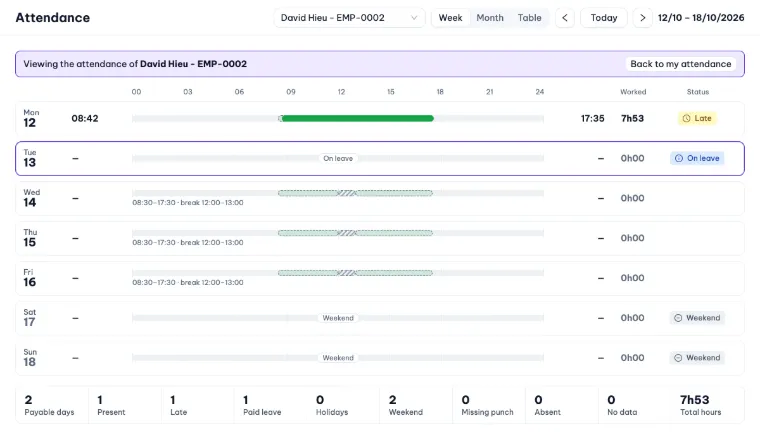
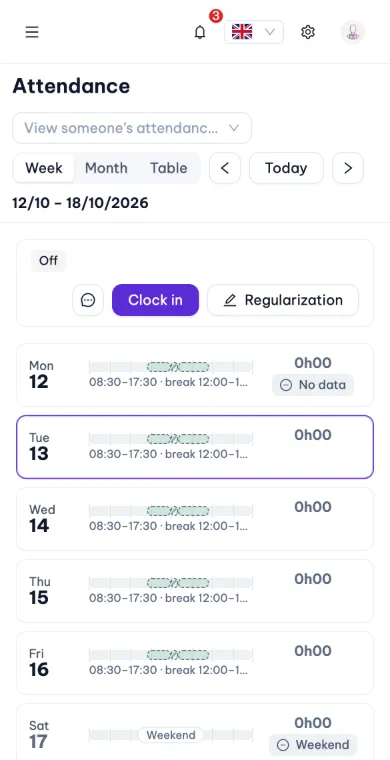
Clock-ins, the planned shift with its break, leave and weekends on one timeline per day, with worked hours and a clear status for every day.
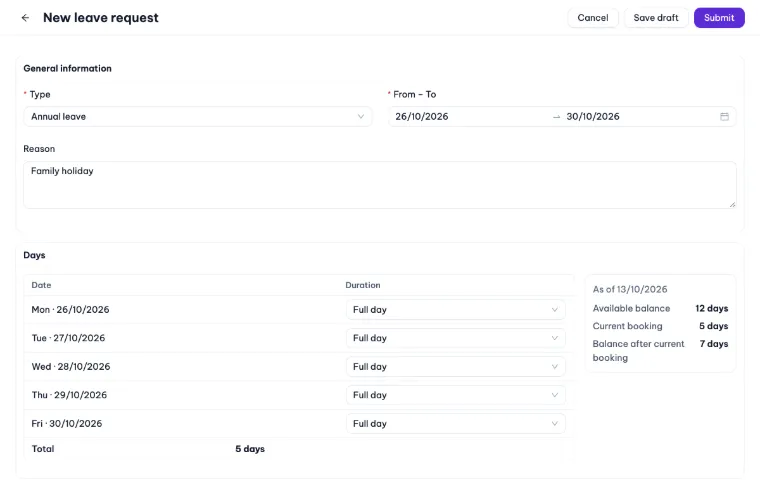
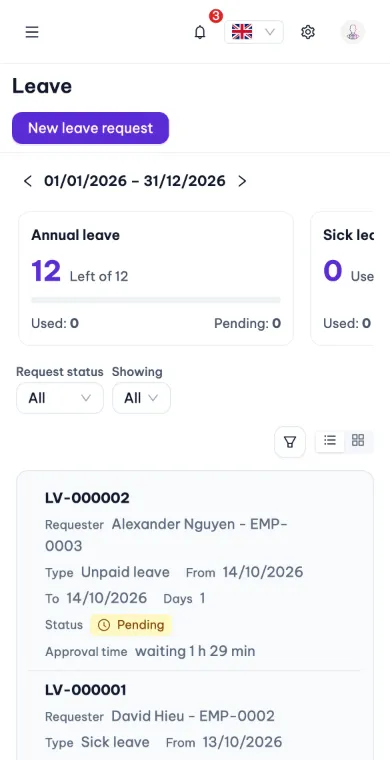
Pick the dates, choose full day or half day for each one and see the balance before and after. Weekends and holidays are left out for you.
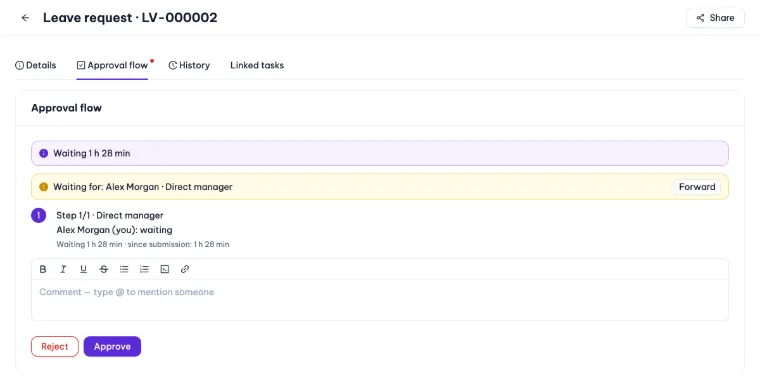
Every request shows who it is waiting for, how long it has waited and every step. Approve, reject or forward with a comment and @mentions.
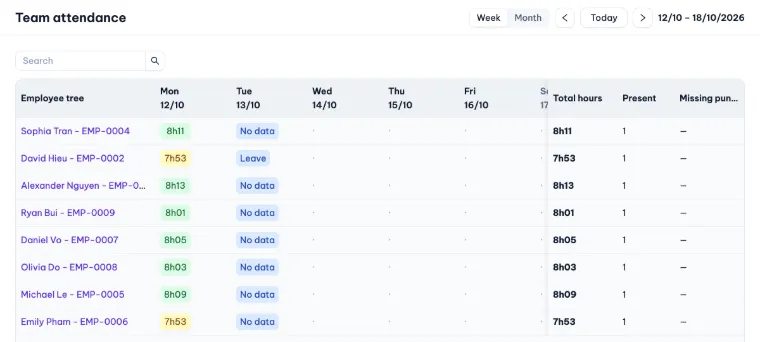
Managers see who worked how long each day, who is on leave and who is missing a punch, and open any day for the details.
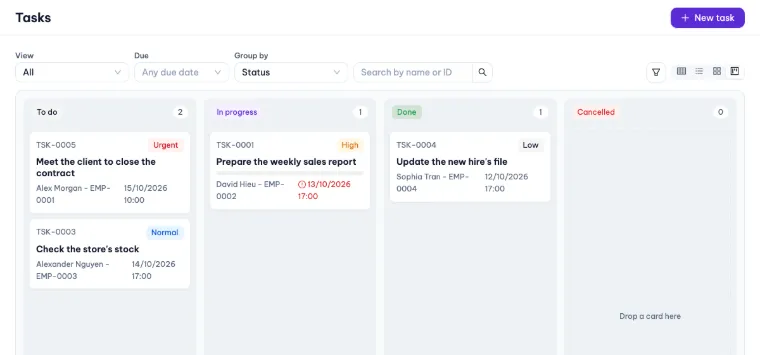
Group work by status, priority, person or team and drag cards between columns.
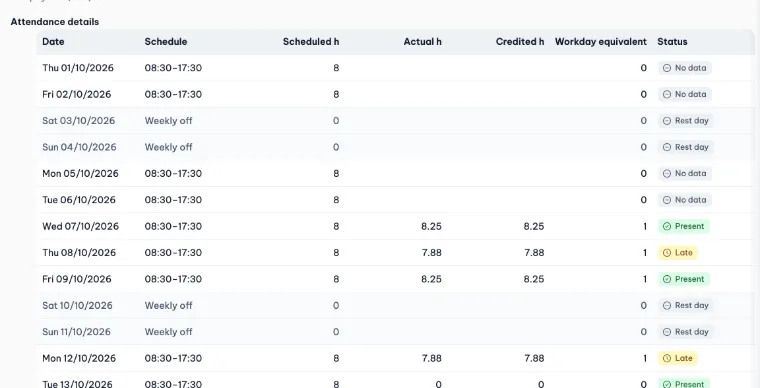
Every payslip keeps the schedule, the hours and the status of each day of the period, so people see exactly what was counted.
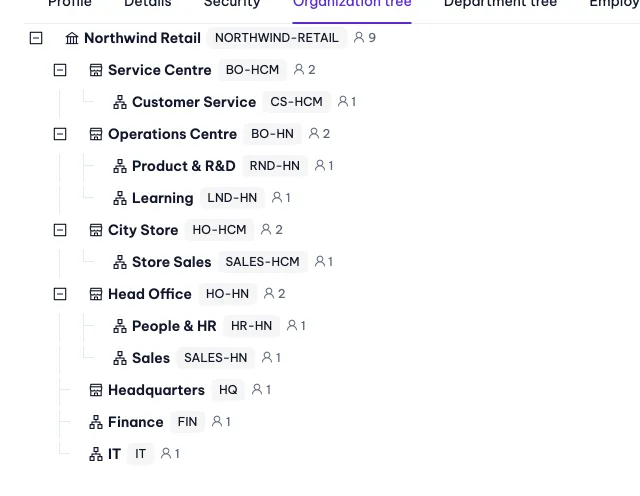
Companies, branches and departments in one tree, with the number of people in each unit.
The same workspace on a phone: clock in with one button, check the week and send a leave request in seconds.
Rules are data, not code: each company keeps its own calendar, time zone and statutory setup.
Social contributions, reference wages and income tax come as versioned country packs with sources and effective dates. Adjust any value per company; every change is audited.
Every timestamp is stored in UTC and shown in the time zone of the branch or company it belongs to.
Each legal entity sets its own weekly days off and public holidays; leave, overtime and payroll follow them.
Interface in English and Vietnamese, and each person picks their own language. Date, time and name formats follow your organisation.
Digital transformation does not have to start with a big project. Move the HR work you repeat every day into one HRM platform and grow from there.
Clock-ins, leave and overtime requests start on the phone; timesheets add up on their own and are ready for payroll.
Requests reach the right manager by reporting line and rules, with reminders and a complete history instead of chat messages.
People, organisation, attendance and payroll share the same records, so dashboards and reports always agree.
Sign up in a minute. A head office, a default shift and leave types are ready. Add sample data if you want to explore first.
Add employees with their managers, invite them to sign in and choose how each location clocks in.
Staff clock in and send requests from their phones, managers approve, and HR closes attendance and payroll.
Start with one shop and grow into a group of companies without changing tools.
Shift-based teams spread over many locations.
Office and field teams that need clear, repeatable processes.
Several legal entities under one roof.
HR data is sensitive. These protections are built in, not bolted on.
Each organisation is isolated in the application and by row-level security in the database.
Roles, data scopes and per-field rules: hidden, masked, read or write. Anything not granted is denied.
Pay amounts are encrypted before they are stored; on mobile, payslips open only after Face ID, Touch ID or a PIN.
Every change and every sensitive view is recorded: who, when and from which app.
Password policies, authenticator-app MFA, lockout after repeated failures, device and session management.
On Plus and Enterprise, sign in with Google Workspace, Microsoft, Okta or any OpenID Connect or SAML 2.0 provider.
Start free and upgrade when you need more. Your data stays with you on every plan.
Every new workspace starts with a 14-day Plus trial. If you don’t upgrade, it moves to Free and keeps all its data.
For small teams getting started
For growing companies
For groups of companies
For large organisations
Yes. Every new workspace gets 14 days of Plus; after that it continues on Free (up to 3 users) unless you upgrade. Your data is kept either way.
The mobile app or a web browser. Clocking in is one button. The conditions (location, Wi-Fi, QR code or selfie) come from your company’s policy.
Contributions, income tax, overtime rates, work weeks and holidays are data you adjust per company. Start from a country pack or set up your own, with every change audited.
Yes. Enterprise customers can install Funexti Human on-premise with an offline licence file. It is the same product as in the cloud.
Create a workspace in minutes and try every Plus feature free for 14 days.